How to Choose a Business Phone System When You're Regulated and Multisite


Most business phone system comparisons start with a feature list. After 29 years on the vendor side of the table, I can tell you the feature list is rarely where a regulated, multisite buyer wins or loses. The questions that decide the outcome are harder. Does the platform support your workflows at every location? What exactly does the vendor's compliance documentation cover? What happens when something fails? And what does the contract actually commit to?
The real differences hide in scope, administration, continuity, implementation, support, and contract terms. Two platforms can look identical on a checklist and behave very differently six months after launch.
This guide covers the six decisions that settle your choice, the mistakes I see turn a good choice into a bad one, and the questions to put to every vendor. That includes us. Ask PanTerra the same questions you ask anyone else, and hold us to the same standard.
Key Takeaways
Choose a business phone system by testing it against your requirements and real operating scenarios, not by counting features. Products that look alike on paper often diverge in administration, integrations, continuity, implementation, support, and contract terms.
- Ask which services the compliance agreement names, not simply whether the vendor will sign one.
- Find out how staff who work at more than one site are provisioned and managed.
- Ask what happens during an outage as a sequence of events, not a percentage.
- Get the support commitment, renewal terms, and exit rights written into the contract.
- Settle your requirements before the first demo, then narrow the field to a short list of finalists.
Who this is for
- Best for: practice leaders, compliance owners, IT leaders, and operations teams evaluating communications across multiple locations, especially where security, records, privacy, or regulatory requirements shape the purchase.
- Not ideal for: a single person looking for a line of their own, or a team that only needs a new desk phone.
- Top use case: replacing an old system, or a patchwork of local carriers, before a contract renews.
What a business phone system has to do for a regulated, multisite organization
For a regulated, multisite organization, the phone system may carry calling, voicemail, fax, messaging, and contact center traffic across every location. Your evaluation should document which of those services are in scope, how administration is delegated, which records and controls exist, and how the service behaves when something fails.
Most cloud business phone systems are sold as UCaaS, or unified communications as a service. That label tells you how the platform is delivered. It does not tell you whether the platform fits a practice with five clinics, a lender with three branches, or any other multisite operation.
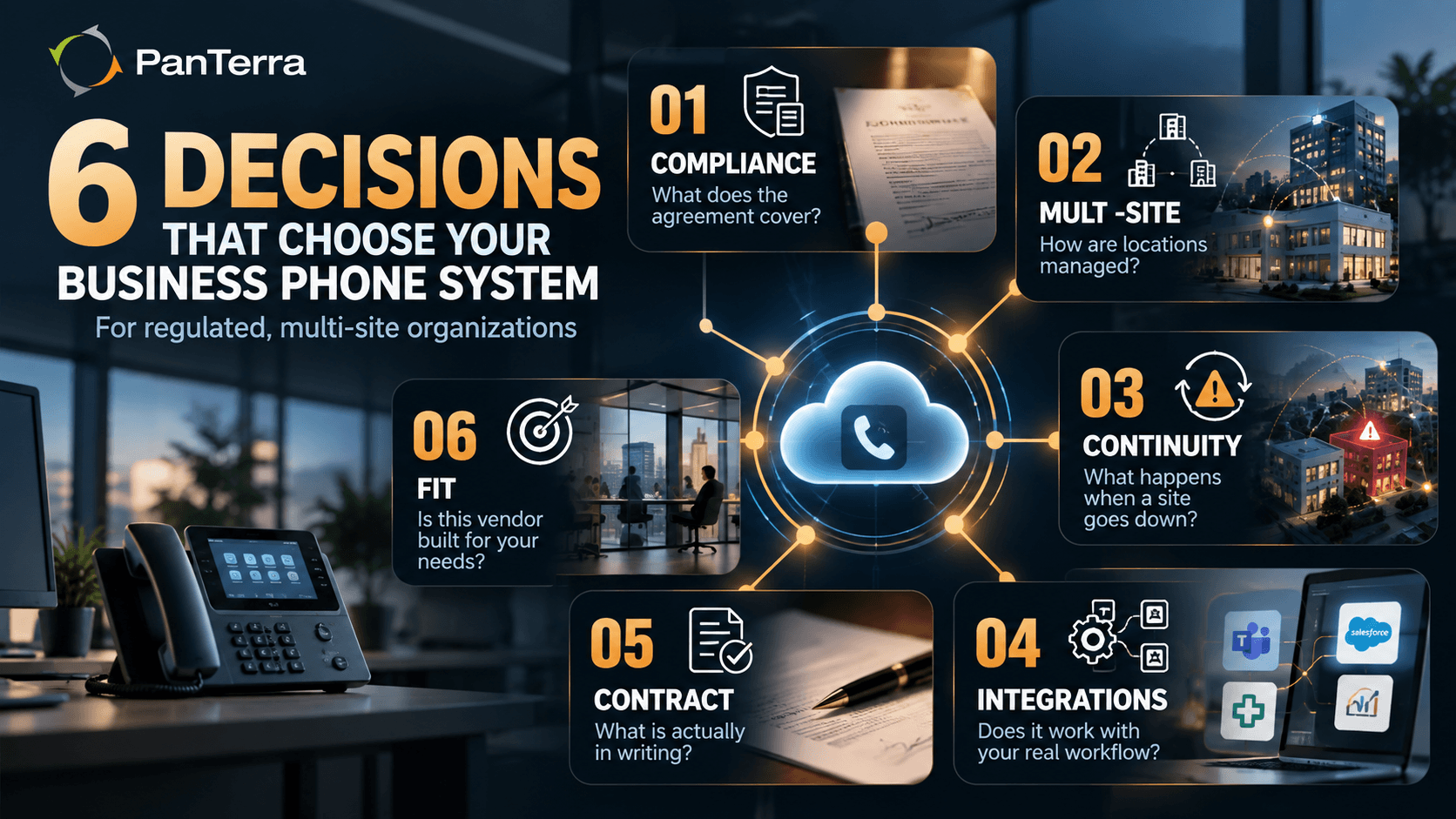
How to choose a business phone system: the six decisions that settle it
Each of these six decisions narrows the field of business phone system vendors. Work through them in order, and your shortlist will largely build itself.
1. Compliance scope: which services the agreement names
Start with protected health information. If a vendor creates, receives, maintains, or transmits PHI on behalf of a covered entity, your compliance or legal owner should determine whether a business associate relationship exists and what agreement and safeguards apply. Then review the BAA against the specific services and workflows you will use. A BAA is not a blanket label for everything a vendor sells.
HHS sets out the provisions every business associate contract must include, from safeguards to breach reporting to the return of data at the end of the contract. What HHS does not tell you is which products a vendor places inside that agreement. That is the first question I would want answered.
A platform may offer voice, voicemail, fax, messaging, video, contact center, and more. Lay the agreement and its supporting documentation next to the channels your staff will actually use. Any gap between the two is a gap in your coverage, and your compliance owner should review it before you sign.
Financial services buyers face the same scope problem with books and records and supervision obligations. The practical question is whether business communications on every approved channel can be captured, retained, retrieved, and supervised the way your policies and applicable rules require. Have your compliance owner map those obligations to the channels people actually use.
Give messaging its own review. A vendor's general HIPAA positioning does not automatically extend to every messaging service or workflow. Ask whether the specific messaging service you plan to use is covered by the vendor's agreement and safeguards. Then have your compliance team validate the workflow before any protected health information moves through it.
2. How you run it across sites
Ask how the platform handles people who work at more than one site. Can a nurse who covers two clinics be managed as one user with access to both, or does each site need its own administration? The answer shapes provisioning, permissions, reporting, and how much duplicate work lands on your team every week.
Next, ask about site templates. A reusable template for hours, routing, greetings, and permissions can take the repetition out of opening a new location. Verify which settings actually inherit from the template and which still have to be configured site by site.
Finally, ask whether local administrators can handle routine changes without broader permissions than they need. Delegating by role relieves the central team while keeping sensitive settings such as routing, recording, retention, and security under control.
3. What happens when a site loses its connection
Ask for a sequence, not a number. When a clinic's internet line fails, what happens in the first minute? Where do calls go? What does the front desk see? What stops working, and what keeps working?
A credible vendor will walk you through that sequence in order: what remains available, what fails, what changes for users, and what manual steps your staff must take.
An availability percentage answers none of those questions. Ask the vendor to show you the actual failover sequence. If your staff takes calls inside Microsoft Teams, ask the same question about a Teams outage. Our piece on what happens to your calls during a Microsoft Teams outage walks through what to ask.
4. Where it has to live
A business phone system rarely stands alone. Before you talk to a vendor, list every system it has to connect with:
- Microsoft Teams, if that is where your staff already work. The Microsoft Teams phone system buyer's guide covers the licensing and continuity questions.
- Your practice management system, EHR, or CRM, so calls and records meet in one place.
- Cloud fax, which many practices and lenders still rely on for referrals, records, and signed forms.
- A contact center, if a central team answers for several sites.
Then ask the vendor to show each connection live, running your workflow, not on a slide. A listed integration does not prove that it supports your workflow, permissions, or data requirements. A live demonstration does.
5. Support and contract terms you can hold them to
General support language is not a commitment. Ask where service levels, support hours, escalation paths, and response definitions are documented, and which of those are contractual.
Three more terms deserve a careful read before you sign. First, what sets your rate at renewal: a fixed rate, a capped increase, or a return to list price? Second, how do you get your data out if you leave, in what format, and how quickly? Third, how fast will the vendor release your phone numbers to a new carrier?
FCC rules generally prohibit a provider from blocking a valid port request over an unpaid balance or termination fee. Timelines still depend on the type of port and the completeness of the request. Ask the vendor to document the process, responsibilities, activation dates, and how exceptions are handled.
6. Fit: when another vendor serves you better
Sometimes the right answer is a different vendor. International coverage, specialized integrations, deployment model, industry requirements, scale, support model, and commercial structure can all reshape the shortlist. Treat fit as a requirement. No buyer should be forced into a product category that does not serve them.
A good vendor will tell you early when it is not the right fit. I would rather a buyer hear that from us in week one of an evaluation than discover it in month four of a contract.
How many vendors to evaluate, and in what order
Narrowing the field to a small number of finalists makes it possible to compare them side by side. The right number depends on your requirements, your procurement process, and how much real differentiation remains after the paper review.
Order matters more than the count. Define your legal, compliance, security, records, operational, and technical requirements before the first demo, and decide which ones you will not compromise on. Then write down the daily workflows and failure scenarios the system must support. Use those materials to screen vendors, and give every finalist the same demo script so the results are comparable. If a contact center is part of the decision, the contact center software evaluation scorecard gives you a way to score each finalist on the same terms.
Finish with references. Ask each finalist for a customer with requirements like yours, and ask what changed between the original implementation plan and the actual rollout. Questions about delays, workarounds, and lessons learned will tell you more than any reference call about what went well.
Mistakes that make a business phone system decision go wrong
Over nearly three decades, I have watched the same patterns stall or sour deals that should have gone well. Check this list before you sign for any business phone system.
☐ Choosing on the price per seat before comparing what each seat includes.
☐ Letting the first demo set your requirements instead of the other way around.
☐ Bringing compliance in after the shortlist is already built.
☐ Comparing one vendor's discounted rate with another vendor's list price.
☐ Assuming every number will port without first auditing your number inventory.
☐ Planning one cutover date for every site at once.
☐ Signing before the support, renewal, and exit terms are in writing.
Questions to ask every vendor, including us
Put the same questions to every business phone system vendor you meet. The value lies in comparing the answers side by side.
|
Decision |
Ask this |
A warning answer |
|---|---|---|
|
Compliance scope |
Which of the services we will use does the agreement name, in writing? |
"We're fully compliant." |
|
Running it across sites |
How are users who work across multiple sites provisioned and managed? |
No clear model for managing users across sites |
|
Outage behavior |
What happens, in order, when one site loses its connection? |
A percentage |
|
Integrations |
Can you show our Teams, EHR, or CRM workflow live? |
A slide |
|
Support |
Where is the support commitment written, and how is "response" defined? |
"We're known for great support." |
|
Contract |
What sets our rate at renewal, and how fast will you release our numbers? |
"We rarely raise prices." |
A vendor that answers these questions clearly and in writing has given you evidence you can compare. Apply that same standard to PanTerra. Ask us for the written answers, and measure them against your own requirements.

Frequently Asked Questions
How do I choose a business phone system?
Start with your requirements and operating scenarios, not a feature count. Define the services and workflows in scope, the legal and compliance documentation you need, how administration works across sites, what happens when something fails, and what the contract must say about implementation, support, renewal, and exit. Then compare finalists against the same written requirements and the same demo script.
What should a regulated organization look for in a business phone system?
Verify which services and workflows the applicable compliance agreement covers, what records the platform can capture and retain, and which retention and access controls are available. Get clear, written answers on data export, number release, and other exit terms before you sign.
Is a cloud phone system better than a system on your premises?
A cloud business phone system can make administration across multiple sites much simpler when the platform centralizes directories, policies, and management. It also reduces the phone system hardware you maintain at each location. Whether it is the better fit depends on your requirements, integrations, network design, and continuity plan, and on the vendor's ability to show how the system behaves when a site loses its connection.
How many vendors should I compare?
Screen vendors on paper first, then narrow the field to a small group of finalists for demos. The right number depends on your requirements and procurement process. Give every finalist the same script so you can compare the demos fairly.
What questions should I ask a business phone system provider?
Ask which services and workflows the applicable agreements cover, how users and administrators are managed across sites, what happens during specific outage scenarios, where support commitments are written, what sets pricing at renewal, and how number porting and data export are handled if you leave.
How long does it take to switch to a new business phone system?
Timelines depend on number porting, site count, network readiness, integrations, hardware, configuration complexity, training, testing, and your own approvals. Ask the vendor which assumptions sit behind its proposed schedule. No single generic timeline is reliable for every deployment.
.jpg?width=500&height=500&name=Are%20you%20Getting%20a%20Good%20Deal%20(1).jpg)
Comments